Shop / Budgets / Coupon Savings
What you get
- Coupon-Savings-Tracker.xlsx: your tracker, ready to fill in
- Coupon-Savings-Tracker-Example.xlsx: the same workbook with made-up entries, so you can see it working
- Coupon-Savings-Tracker-User-Guide.pdf: 9 pages with clickable contents, a set-up checklist you can tick on screen, a tab-by-tab tour and fixes for common snags
- Instant download. Nothing is shipped.
Summary tab
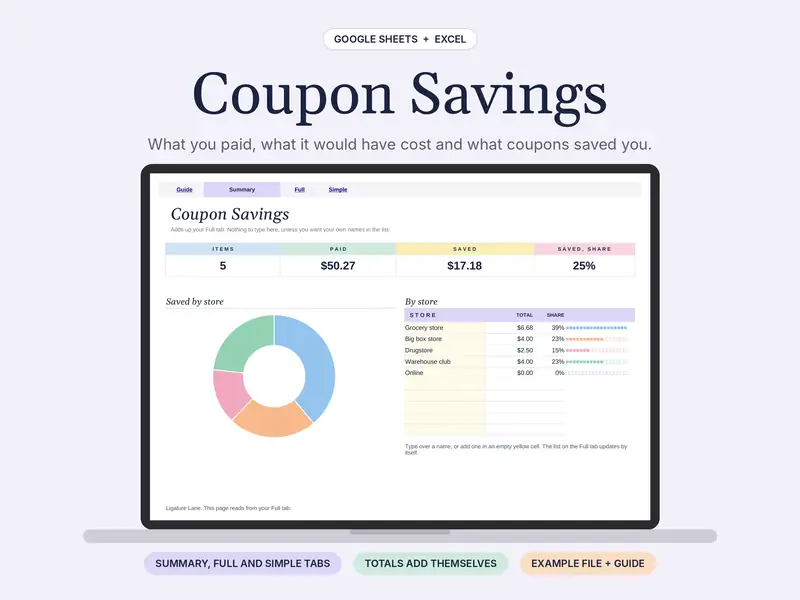
The totals from your Full tab as cards, a chart (saved by store) and a table beside it. It updates as you type.
Full tab
Adds the date, store and notes, and your share saved. Saved by store sits on the Summary tab with a chart. Room for 500 items.
Simple tab
Item, regular price, paid and saved, with items, paid and total saved at the top.
Built to be hard to break
- A menu on every tab and a Guide tab inside the workbook
- In Excel, formulas are locked so a stray keystroke can't break them (no password; unlock a tab any time). Google Sheets does not carry the locks over
- A friendly message if a date or amount doesn't look right
- No macros
Good to know before you buy
- This is a spreadsheet, not an app. It does not connect to any account.
- Type the shelf price before any coupon as the regular price.
- Type your own stores over the example names on the Summary tab.
- Charts and colors can look slightly different in Google Sheets than in Excel. The numbers are the same.
What you need
Microsoft Excel 2016 or newer, or a free Google account for Google Sheets. A computer is easiest.
How to open it in google sheets
Go to sheets.google.com, choose File > Import > Upload, and pick the file.
License and returns
For your own household or business. Print it or copy it for yourself as often as you need. Please don't resell, share or post the files. Full license.
Because this is a digital download, it can't be returned. If anything won't open or doesn't add up, email hello@ligaturelane.com and we'll fix it.